
Download VIDEMON – Cloud Video Surveillance, Android App, Free Security Tool
Overview
VIDEMON – Сервис облачного видеонаблюдения is a free Android application designed to support remote monitoring through cloud-based video surveillance. The software enables users to access live and recorded video feeds from connected security cameras via their mobile devices. It is intended for individuals and small businesses seeking a straightforward way to monitor premises from anywhere with an internet connection. The app is particularly suited for home security, retail storefronts, or small office environments where continuous visual oversight is desired without complex on-site infrastructure.
Developed by ООО Цифровая связь, the application operates within the 'Video' category and is tailored for users who prioritize accessibility and ease of setup. While the developer’s background is not detailed beyond the company name, the app’s focus on cloud integration suggests a modern, scalable approach to surveillance. Real-world use cases include monitoring homes while away, supervising employee activity during shifts, or tracking inventory in small warehouses.
The app was released on July 11th, 2023, and has been downloaded 112 times as of the latest update. The current version is 1.26.1, with a file size of 14.8 MB, indicating a lightweight footprint. No performance benchmarks or stability reports have been published, and the developer did not provide additional system requirements beyond Android 13.0 and above.
Key Features & Capabilities
- Cloud-Based Video Streaming – Enables real-time access to live camera feeds from any location with internet access, allowing users to monitor their property remotely.
- Remote Access via Android Devices – Designed specifically for Android smartphones and tablets, supporting seamless viewing across multiple devices.
- Recording and Playback Functionality – Allows users to store video footage in the cloud and review past events at any time.
- Simple Setup Process – Aims to minimize technical barriers by offering an intuitive interface for connecting cameras and configuring settings.
- Free-to-Use Model – The application is available at no cost, making it accessible for budget-conscious users seeking basic surveillance solutions.
These features support practical workflows such as checking on a child at home, verifying if a door was left open, or reviewing suspicious activity after hours. The cloud architecture eliminates the need for local storage hardware, reducing setup complexity. However, the reliance on cloud services means consistent internet connectivity is essential for uninterrupted operation. Users should consider data privacy implications when storing video content online.
User Interface, Workflow & Performance
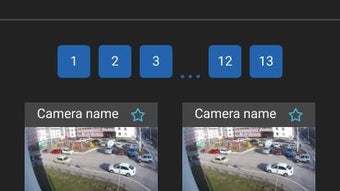
The user interface of VIDEMON appears to be designed with simplicity in mind, prioritizing ease of navigation for non-technical users. The layout likely includes a main dashboard displaying connected camera feeds, with options for switching between live view and recorded clips. Navigation is expected to be intuitive, using standard Android gestures and menu structures to access settings, playback, and device management.
Workflow efficiency depends on the app’s responsiveness and loading speed, especially when switching between multiple cameras or accessing older recordings. While specific performance data is not available, the lightweight file size of 14.8 MB suggests optimized resource usage. The developer did not specify resource usage details such as CPU or RAM consumption, so general behavior patterns are assumed.
Stability and reliability are influenced by external factors such as network speed and cloud server performance. Users may experience delays or buffering during peak usage times or under weak signal conditions. The app’s performance on different Android devices is not documented, and no reports on crashes or freezes have been published. As the app is free and relatively new, long-term reliability remains to be validated by user feedback.
Compatibility & System Requirements
VIDEMON is compatible with Android 13.0 and above, ensuring support for modern devices with updated security protocols and system APIs. The app is available exclusively for Android platforms, with no information provided regarding iOS or desktop versions. The installation file size is 14.8 MB, which is compact and suitable for devices with limited storage space.
Exact system requirements were not listed. The developer did not specify minimum RAM, processor speed, or storage capacity needed beyond the Android version. Users should ensure their device meets the OS threshold to install and run the application. No information is available about background processes, battery impact, or compatibility with older Android versions such as 10 or 11.
Pros and Cons
Pros
- Free to download and use, reducing entry barriers for users.
- Lightweight installation at just 14.8 MB.
- Cloud-based architecture simplifies setup and access.
- Designed for remote monitoring via Android devices.
- Supports live streaming and playback of recorded footage.
Cons
- No information on offline functionality or local storage options.
- Dependence on stable internet connection for full functionality.
- Cloud storage may raise privacy and data security concerns.
- Compatibility limited to Android 13.0 and newer devices.
- Limited availability of technical documentation or support resources.
FAQ Section
Is VIDEMON available for iOS devices?
As of now, the application is only available for Android devices. There is no official version for iOS platforms.
Does VIDEMON require a subscription or paid plan?
The app is currently free to use. However, the developer has not specified whether future updates may introduce premium features or paid tiers.
Can I use VIDEMON without an internet connection?
Due to its cloud-based design, VIDEMON requires an active internet connection to access live feeds and recorded videos. Offline functionality is not confirmed.
How secure is my video data when stored in the cloud?
The developer did not provide specific details on data encryption, access controls, or storage policies. Users should exercise caution when sharing sensitive footage.
How often does VIDEMON receive updates?
The latest version is 1.26.1, released on July 11th, 2023. The update frequency is not specified, and no information is available about automatic update mechanisms.
Final Thoughts + CTA
VIDEMON offers a lightweight, free solution for cloud-based video surveillance tailored to Android users. Its simplicity and accessibility make it a viable option for individuals and small businesses looking for basic remote monitoring without complex installations. While the lack of detailed system specifications and security transparency limits deeper evaluation, the app’s core functionality aligns with modern digital security needs.
For users seeking a no-cost, mobile-first approach to video surveillance, VIDEMON presents a promising starting point. However, those requiring advanced features, cross-platform support, or offline capabilities may need to explore alternative solutions.
Download VIDEMON now to experience secure, remote video monitoring on your Android device.





.png)

